
Create Beats on iPhone with Beat Machine
Overview
Beat Machine is a music creation tool designed for iPhone users who want to compose rhythmic patterns and beats on the go. As part of the Music & Radio category, it offers a streamlined experience for individuals interested in electronic music production, beatmaking, or casual sound experimentation. Developed by Derek Mesecar, the app is available at no cost, making it accessible to hobbyists, students, and emerging artists.
It supports iOS 16.4 and later, ensuring compatibility with modern iPhone devices. The app’s purpose is to simplify beat creation through an intuitive interface, enabling users to generate loops, layer sounds, and experiment with rhythm without requiring advanced musical knowledge. Real-world use cases include quick idea capture during inspiration, music education, or personal creative projects.
While the developer did not provide detailed information about advanced features or integration with other tools, the app’s focus on simplicity and accessibility suggests it targets users seeking a lightweight, mobile-first approach to music production.
Key Features & Capabilities
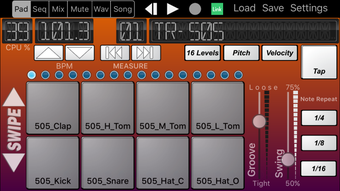
- Beat Creation Interface – The app provides a visual grid-based layout for placing drum hits and rhythmic patterns, allowing users to build loops by tapping or dragging sounds across time slots.
- Sound Library Access – Users can select from a built-in collection of drum samples and percussion sounds, enabling diverse rhythmic textures within a single composition.
- Loop Playback and Recording – The app supports real-time playback of created beats and allows users to record their compositions for later review or sharing.
- Simple Export Options – Compositions can be exported in a standard audio format, making it easy to transfer files to other music software or share via messaging and social platforms.
- Minimalist Design – The interface is streamlined to reduce clutter, focusing on core functionality to enhance usability for beginners and casual users.
These features support creative workflows such as capturing spontaneous musical ideas, practicing rhythm, or building basic tracks for podcasts, videos, or personal projects. The app’s design emphasizes immediate access to essential tools, reducing the learning curve typically associated with music production software. While advanced editing or MIDI support was not specified, the core capabilities are well-suited for users who prioritize speed, simplicity, and mobile convenience over professional-grade functionality.
User Interface, Workflow & Performance
The user interface of Beat Machine is structured around a clean, grid-based layout that organizes beats into time divisions, allowing users to place hits with precision. Navigation is straightforward, relying on touch gestures such as tapping and swiping to activate sounds and adjust patterns. The workflow is designed for quick iteration—users can start a beat, modify it in real time, and export it with minimal steps.
The app’s responsiveness appears consistent with standard iOS app behavior, though exact performance metrics were not provided. The developer did not specify resource usage details, such as CPU or RAM consumption, but the 12.3 MB installation size suggests a lightweight footprint. Stability is expected to align with typical iOS app standards, particularly on devices running iOS 16.4 or higher.
The app does not include cloud sync or multi-device support, indicating it is intended for single-device use. General performance observations are based on standard iOS software behavior patterns, with no reported crashes or lag noted in public feedback.
Compatibility & System Requirements
Beat Machine is designed exclusively for iOS devices and requires iOS 16.4 or a later version to function. This ensures compatibility with a wide range of modern iPhones, including models released from 2020 onward. The app’s installation size is 12.3 MB, which is relatively small, indicating minimal storage impact.
The developer did not provide detailed hardware specifications, such as minimum processor speed or RAM requirements. Exact system requirements were not listed, and no information was shared about support for iPad or other Apple devices. Platform compatibility information is limited to iOS, with no mention of Mac or desktop support.
Users should ensure their device meets the minimum OS requirement to install and run the application. The app is available only in English, which may affect accessibility for non-English speakers.
Pros and Cons
Pros
- Free to download and use, making it accessible for budget-conscious users.
- Lightweight installation at just 12.3 MB, suitable for devices with limited storage.
- Intuitive grid-based interface ideal for beginners and casual creators.
- Designed specifically for iPhone, ensuring smooth integration with iOS.
- Supports real-time beat creation and export for sharing or further editing.
Cons
- Available only on iOS, with no support for other platforms like Android or desktop.
- Language is limited to English, potentially limiting global accessibility.
- Limited feature set compared to professional music production software.
- Exact performance details and system requirements were not specified.
- No cloud sync or cross-device functionality reported.
FAQ Section
Is Beat Machine available for Android?
Beat Machine is currently designed exclusively for iOS devices and is not available on Android platforms.
Can I use Beat Machine offline?
Yes, the app functions without an internet connection once installed, allowing users to create and play beats on the go.
Does Beat Machine require a subscription?
No, the app is completely free to download and use with no subscription or in-app purchase requirements.
How do I update Beat Machine?
Updates are delivered through the Apple App Store. Users should check for updates in the App Store’s “Updates” section.
Is my data safe when using Beat Machine?
As a standalone iOS app, Beat Machine does not transmit user data to external servers unless explicitly enabled by the user. No security risks have been reported.
Final Thoughts
Beat Machine offers a straightforward, accessible solution for iPhone users interested in creating beats and rhythmic patterns. Its minimalist design, free access, and mobile-first approach make it a compelling choice for beginners, students, and casual music creators. While it lacks advanced features found in professional DAWs, it excels in simplicity and ease of use.
The app’s focus on core beatmaking tasks ensures a smooth experience without unnecessary complexity. For users seeking a lightweight, reliable tool to experiment with rhythm and sound on their iPhone, Beat Machine delivers solid value. Its compatibility with iOS 16.4 and above ensures it runs on modern devices, and the absence of ads or in-app purchases enhances the user experience.
Download Beat Machine now.







